FastVid AI: Photo to Video
- 3.4
- Rating
- 100.00K
- Installs
- Free
- Price

 Analysis by App-foxy
I tested FastVid AI, a lifestyle app from Ankit20, with one practical question in mind: does it make sense when more than one person in a household wants to turn photos into short videos or add playful edits? My answer is cautiously positive. It is easy to understand, free to install, and aimed at quick creative results rather than serious video production. The experience is most appealing when someone wants to make a birthday montage, a casual social post, or a stylized image without opening a full desktop-style editor.
The important household detail is that this is not an app I would hand to every member of a family without thinking about context. Its content rating is Mature 17+, and that matters when a phone is shared with younger users. The app may be useful for adults coordinating a small creative task, but it should not be treated as a child-focused editor simply because the interface is approachable.
How FastVid AI fits into a shared household
A realistic use case is a family preparing a short birthday video. One person has the photos, another chooses the visual style, and a third wants to send the finished result to relatives. FastVid AI suits the quick middle step: import a few images, try a template or effect, adjust the result, and decide whether it feels presentable enough to share. I found that its strongest appeal is reducing the distance between “I have some photos” and “I have something that looks like a video.”
You May Also Like

 Pandora - Music & Podcasts
Pandora’s Music Is Easy to Start, but Harder to Recover
Pandora’s strength is its low-effort path from a seed to a station. Its weak spot is how much confidence it asks you to place in connection, setup, and quiet recovery.

 AccuWeather: Weather Radar
AccuWeather Review: A Quick, Clear Forecast for Everyday Decisions
For everyday plans, the best forecast is the one you can understand quickly. AccuWeather makes rain timing, radar, and local conditions easy to act on, with a few trade-offs.

 Hill Climb Racing
Why Hill Climb Racing Still Turns Crashes Into One More Run
A tiny car, a bumpy hill and one more upgrade: Hill Climb Racing keeps resurfacing because its simple chaos makes every near-miss feel personal.

 AliExpress - Shopping App
AliExpress Makes Global Shopping Feel Personal, but Shoppers Bear the Risk
AliExpress turns a global marketplace into a pocket-sized discovery engine. Its reach is useful, its shopping loop compelling, and its trade-offs easy to miss.

 Lords Mobile: Kingdom Wars
Lords Mobile Is a Kingdom-Building Routine, Not a Quick Match
A case-by-case verdict on the building, battles, device demands, and social commitments that make Lords Mobile rewarding for some players and exhausting for others.

 PDF Scanner app - TapScanner
TapScanner Makes Paperwork Easier to Capture, Check, and Share
TapScanner makes scanning with a phone feel less like a rescue operation and more like a dependable step in getting work done. Its capture tools are useful, though not flawless.
More From Our News Desk
View All News


That convenience is different from what I expect from a traditional mobile editor. Apps such as full timeline editors give me more control over clip duration, transitions, audio placement, layers, and text timing. They are better when I need a carefully paced result. FastVid AI is more attractive when the priority is speed and visual experimentation. The trade-off is clear: I spend less time building the project, but I also have less reason to expect precise control over every moment.
For a shared device, I would establish a simple workflow before anyone starts. The person collecting photos should make a dedicated selection first rather than handing over the entire gallery. That keeps the creative process focused and reduces the chance of accidentally choosing a private image. I would also decide who has final approval before exporting or sharing. This sounds basic, but quick AI-assisted editing can make people move faster than they normally would.
The app’s combination of photo editing, templates, magic-style effects, and video generation makes it suitable for several small household projects. A parent might prepare a travel recap, roommates could create a moving-day clip, or a couple might turn a set of event photos into a visual greeting. In each case, the value comes from convenience rather than professional finishing. I would recommend it to someone who wants a result in minutes, not to someone who wants a complete replacement for a dedicated editing suite.
What the first session feels like
FastVid AI is presented as an app called FastVid AI: Photo to Video, and the short store label is simply FastVid AI. The current release is version 1.0.2, which gives me the impression of a relatively early product rather than a mature platform with years of refinements. That is not automatically bad, but it changes my expectations. I look for a straightforward path into the main editing task and remain alert for rough edges around consistency, export behavior, and project organization.
The most useful way to approach the first session is with a small test project. I would begin with a handful of non-sensitive photos, try one template, then compare it with a more restrained effect. This reveals whether the visual style matches the household’s purpose before anyone spends time preparing a large montage. It also prevents a common mistake: assuming that an attractive preview will automatically suit every image in a mixed collection.
For a group project, I prefer one person to act as editor while others give feedback. Passing the phone around during every adjustment can lead to accidental changes and confusion about which version is final. FastVid AI works better when the household treats it as a small creative workstation rather than a shared chat. The editor can show previews, collect suggestions, and keep the selected photos in a deliberate order.
I would also keep original images separate from edited results. The safest practical habit is to create a duplicate selection for the project and avoid treating the app as the only copy of anything important. This is especially useful when several people are contributing photos from different devices. It gives the household a clear source folder and a separate finished-media folder, making later revisions less frustrating.
Boundaries matter more than speed on a shared phone
Because the app combines AI-style generation with visual effects, I would not let younger household members experiment unsupervised on a phone containing private family material. The Mature 17+ label is the clearest reason, but privacy and consent are equally important. Before using a person’s face in a stylized video, I would ask whether that person is comfortable with the result being saved or shared. A funny effect can still feel intrusive when someone did not agree to it.
Account boundaries deserve attention too. I would avoid assuming that a shared device creates a shared workspace. If the app presents any sign-in, saved-project, or purchase step during use, the adult responsible for the phone should handle it personally rather than letting a child or guest tap through screens. I am deliberately careful here because a household often has several people using the same device, while billing responsibility belongs to one person.
The app is free to install, but optional in-app items range from $1.99 to $99.99 each. That is a wide enough range to make purchase boundaries essential. I would keep purchase authentication enabled on the device, explain that “free to install” does not mean every creative option is free, and review any payment prompt before confirming it. For a shared phone, this is not a minor detail; it is part of the setup.
My preferred arrangement is simple: one adult chooses the photos, one person operates the editor, and nobody exports or buys anything without a final check. This avoids two common problems at once. First, a younger user is less likely to encounter an unsuitable creative context. Second, the household is less likely to pay for an effect or item that was selected accidentally during experimentation.
Another useful boundary is deciding where finished videos may go. I would separate “save for the family” from “post publicly.” A video made for relatives does not automatically belong on a public profile. FastVid AI may make creation feel immediate, but sharing still deserves a pause. I would check faces, names, backgrounds, visible addresses, and any private event details before sending the result outside the household.
Coordinating photos, feedback, and final approval
The app is easiest to use when the creative brief is small. Instead of asking everyone to “make something nice,” I would agree on three points: the purpose of the video, the mood, and the audience. For example, a family could decide on a warm travel recap for close relatives. That direction makes it easier to reject effects that look entertaining but do not fit the occasion.
A practical workflow starts with a curated photo batch. I would remove duplicates, blurry shots, and images that reveal more than intended before opening the editor. Then I would test one template against both portrait and landscape images if the collection includes both. Mixed orientations can change how a finished sequence feels, and a template that looks good with one photo shape may make another feel cramped or poorly framed.
The next step is comparison rather than endless tweaking. I would create two candidate versions: one using a restrained effect and another using a more dramatic style. Showing both to the household is more productive than changing one project repeatedly without a clear target. It also exposes a key trade-off in AI-assisted editing: the most noticeable effect is not always the most flattering treatment of the people or places in the photos.
For coordination, I would keep feedback specific. “Make it better” is not useful. “Use fewer effects,” “put the group photo at the end,” or “remove the image with the street sign” gives the editor an actionable change. FastVid AI’s appeal is quick creation, so a focused review process preserves that advantage instead of turning a short project into a debate.
I would also decide who owns the final export. If the photos came from several people, the finished video should be sent back to the contributors rather than remaining on one person’s phone. This is particularly important for shared-device households where the next user may not know which files are personal, temporary, or ready to delete. A clear handoff prevents accidental loss and reduces clutter.
One non-obvious benefit of this approach is that it makes the app useful even when the final video is not perfect. The first version becomes a visual draft. A household can use it to discover which photos tell the story, then move to a more advanced editor if exact timing or detailed sound work becomes important. In that role, FastVid AI is not competing directly with every traditional editor; it is helping people decide what they want to make.
Age, trust, and responsible creative use
The Mature 17+ rating should shape how I recommend the app. I would not describe it as a general children’s activity or place it on a young child’s personal device without adult involvement. Even if a particular project is harmless, the rating signals that families should consider age and supervision before use. A teenager who is close to the rating may be able to use it responsibly, but I would still explain the rules around faces, sharing, and purchases first.
Trust also includes how people react to altered images. AI effects can change expressions, atmosphere, or the apparent movement of a photo. In a household, that can be fun when everyone understands the result is playful. It can be uncomfortable when an edited image is presented as if it were an untouched memory. I would label particularly transformed clips as edited when sending them to relatives, especially if the effect changes the appearance of a person.
For family memories, I prefer consent over surprise. A person might enjoy a dramatic effect in a private group chat but dislike seeing the same image posted publicly. I would ask before using someone’s face in a joke, and I would remove any image if the subject objects. The app makes visual experimentation easy; that makes respectful judgment more important, not less.
There is also a practical trust issue with shared accounts and devices. I would not let a guest browse through a household photo library just because they want to try a template. Instead, I would prepare a small set of images specifically for the project. This gives the editor enough material while protecting unrelated personal photos. It is one of the simplest ways to make a shared-device workflow feel controlled without pretending the app is a family-management tool.
Users should also remember that a polished effect does not fix a weak photo selection. If the source images are repetitive or poorly framed, adding more visual treatment can make the result busier rather than better. My advice is to improve the selection first, then use effects as seasoning. That is a more reliable path than choosing the most dramatic option immediately.
Where it beats ordinary editors, and where it does not
Compared with a basic slideshow maker, FastVid AI sounds more ambitious because it brings together photo-to-video creation and stylized editing in one place. That makes it attractive for people who want an assisted starting point instead of manually arranging every image. I would choose it for a short greeting, a quick memory reel, or a social experiment where the visual effect is part of the point.
Compared with a conventional timeline editor, its likely advantage is reduced effort. I do not need to begin by learning a large set of controls just to see whether a concept works. The weakness is that convenience can limit precision. If I need exact beat matching, detailed captions, layered sound, careful color correction, or a long sequence with many revisions, I would rather use a dedicated editor.
Compared with a simple photo editor, FastVid AI is better suited to motion and presentation. A single enhanced photo may be enough for a profile image or a family print, but a group of photos can tell a fuller story when arranged as a video. Still, users who only want cropping, brightness correction, or careful retouching may find the video-oriented approach unnecessary.
The average rating is 3.4 from around a hundred ratings, with a smaller set of written reviews. I read that as a reason to keep expectations measured rather than as a final verdict. The app has enough visibility to show that people are trying it, but the rating also suggests that the experience may not satisfy everyone equally. For me, the deciding factor is whether the user values speed and effects more than complete editing control.
Its reach is already substantial, with over one hundred thousand installs, but popularity does not change the household questions. The right choice still depends on who will use it, what photos will be involved, and whether the project needs a quick visual result or a carefully engineered production. I would not install it simply because it is popular; I would install it for a specific, manageable creative task.
Who should use it and who should skip it
I would recommend FastVid AI to adults who want to turn a small group of photos into something more lively without learning a complex editor. It is also a reasonable choice for a household coordinator who needs to prepare a quick event recap, greeting, or private family video. The free entry point makes experimentation easier, provided the person using the device understands that optional purchases may appear.
I would be more cautious recommending it to someone who needs dependable professional output. A client presentation, a documentary-style family archive, or a project with exact timing requirements calls for stronger control and a clearer revision workflow. In those situations, a full editor is the better investment of time, even if the first session feels slower.
I would also skip it for a young child’s unsupervised creative play because of the Mature 17+ rating and the possibility of purchase prompts. A shared family tablet with an adult guiding the project is a different situation from unrestricted access on a child’s personal device. The distinction matters, and I would not blur it just because the app is visually approachable.
Finally, people who dislike AI-style transformations may prefer a conventional photo editor. The magic-effect angle is central to the app’s identity, so someone seeking natural, invisible corrections may feel that the available creative direction is too much. In that case, a simpler tool built around manual adjustments would be a better match.
My household verdict
FastVid AI is a useful quick-start option for adults who want to turn selected photos into a lively video or apply a noticeable visual style without committing to a complicated editing workflow. I like it most as a shared project tool: one person prepares the images, another helps choose the mood, and the group reviews the result before it is exported or shared.
My recommendation comes with clear boundaries. Keep the app away from unsupervised younger users, treat the Mature 17+ rating seriously, protect private photos by preparing a limited selection, and remember that optional in-app items can cost from $1.99 to $99.99. Those steps are more important on a shared device than they would be on a phone used by one careful adult.
The developer, Ankit20, has made an approachable lifestyle app with a focused appeal, but I would judge it by the job at hand. For a fast birthday montage or an experimental photo reel, FastVid AI can save time and make the first draft more enjoyable. For exact editing, extensive family archiving, or professional delivery, I would choose a more controlled alternative.
Overall, I would keep it installed for occasional household projects rather than make it the default editor for every photo and video. Its best quality is immediacy: it helps a group move from scattered images to a shareable idea quickly. Used with adult oversight, clear ownership, and a final privacy check, that is a worthwhile role for a free app.
FAQs for FastVid AI: Photo to Video
01What is FastVid AI: Photo to Video and what can it do?
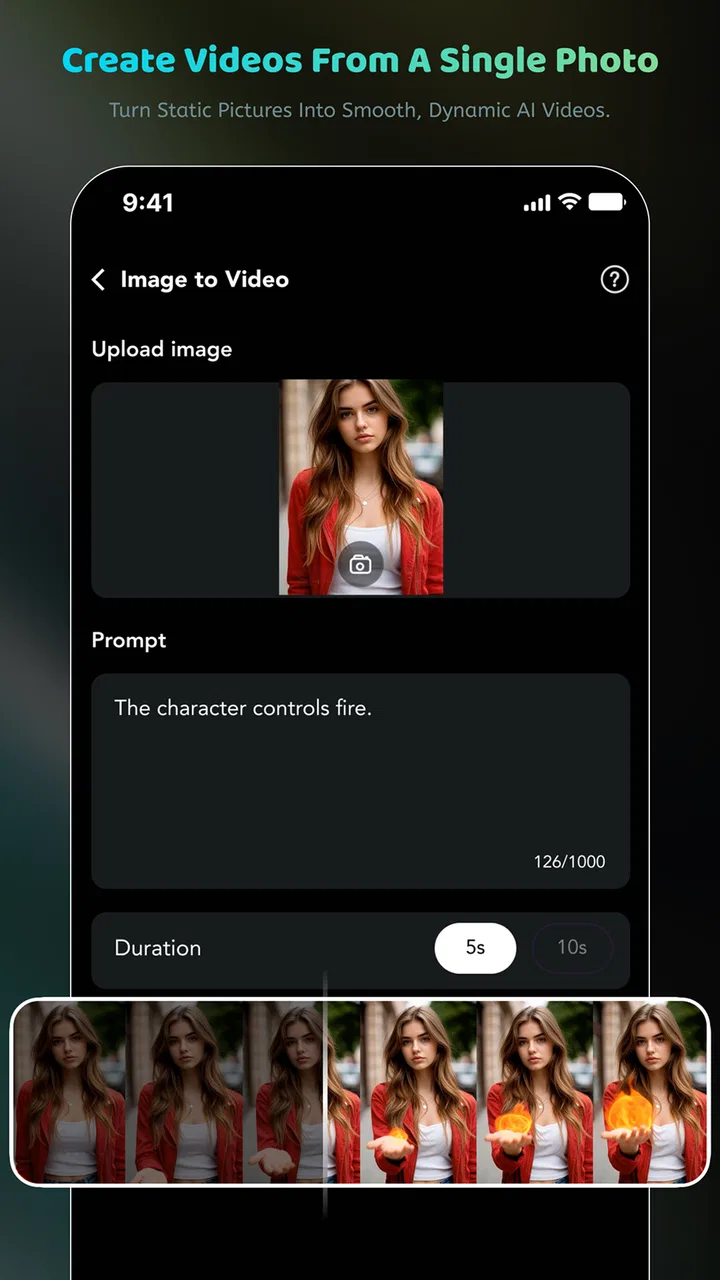
FastVid AI: Photo to Video is a mobile application designed to turn still images into short animated videos using artificial intelligence. After selecting a photo, users can apply motion effects, transitions, templates, and music to create content suitable for social media. The app is mainly aimed at quick, visually engaging edits rather than advanced, frame-by-frame video production.
02Is FastVid AI: Photo to Video free to download and use?
FastVid AI: Photo to Video may be available to download at no initial cost, but some features can be limited by advertisements, credits, watermarks, or a premium subscription. Before creating multiple videos, check the pricing page and in-app purchase details carefully. Subscription terms, trial periods, and available tools may vary depending on your device, region, and the current version of the application.
03How do I create a video from a photo in FastVid AI?
To create a video, users generally select an image from the phone gallery, choose an AI animation style or visual effect, and then adjust optional settings such as duration, music, text, or aspect ratio. Processing time depends on the image, effect, and internet connection. Once the result is generated, it can normally be previewed, saved, or shared through compatible apps.
04Does FastVid AI require an internet connection or access to my photos?
The application may request permission to access photos or videos so you can choose media for editing. Certain AI effects may also require an active internet connection because processing can take place on remote servers rather than entirely on the phone. Review the permissions requested during installation, avoid selecting unnecessary access when possible, and consult the app’s privacy policy before uploading personal or sensitive images.
05Are videos created with FastVid AI suitable for social media?
FastVid AI can be useful for producing short clips for platforms such as Instagram, TikTok, Facebook, and messaging services, especially when you want to animate portraits, product images, or memorable photographs quickly. However, export resolution, video length, watermarks, and aspect-ratio options may depend on the selected template or subscription. Preview the final file before publishing to confirm that quality and formatting meet your expectations.
Pros
- Turns still photos into engaging AI-generated videos quickly.
- Simple interface makes it accessible for beginners.
- Offers creative templates
- effects
- and animation styles.
- Useful for social media posts
- stories
- and short-form content.
- Saves time compared with editing photo animations manually.
Cons
- AI results can vary noticeably between different photos.
- Some advanced effects may require a paid subscription.
- Generated videos may include branding on the free plan.
- Processing can take longer with high-resolution images.
- Requires internet access for most AI video-generation features.

FastVid AI: Photo to Video
Gallery